Most people's first experience with AI goes something like this: they type a vague question, get a vague answer, and walk away thinking the technology isn't that useful.
The reality is that AI is only as good as the instructions you give it. A well-structured prompt can be the difference between a generic paragraph and a genuinely useful output that saves you hours of work.
At D55, we run AI workshops with organisations across the energy, maritime, and technology sectors. One of the most consistent things we see is that the people getting the best results from AI aren't the most technical — they're the ones who have learned how to communicate clearly with it. This guide breaks down exactly how to do that.
The prompt framework
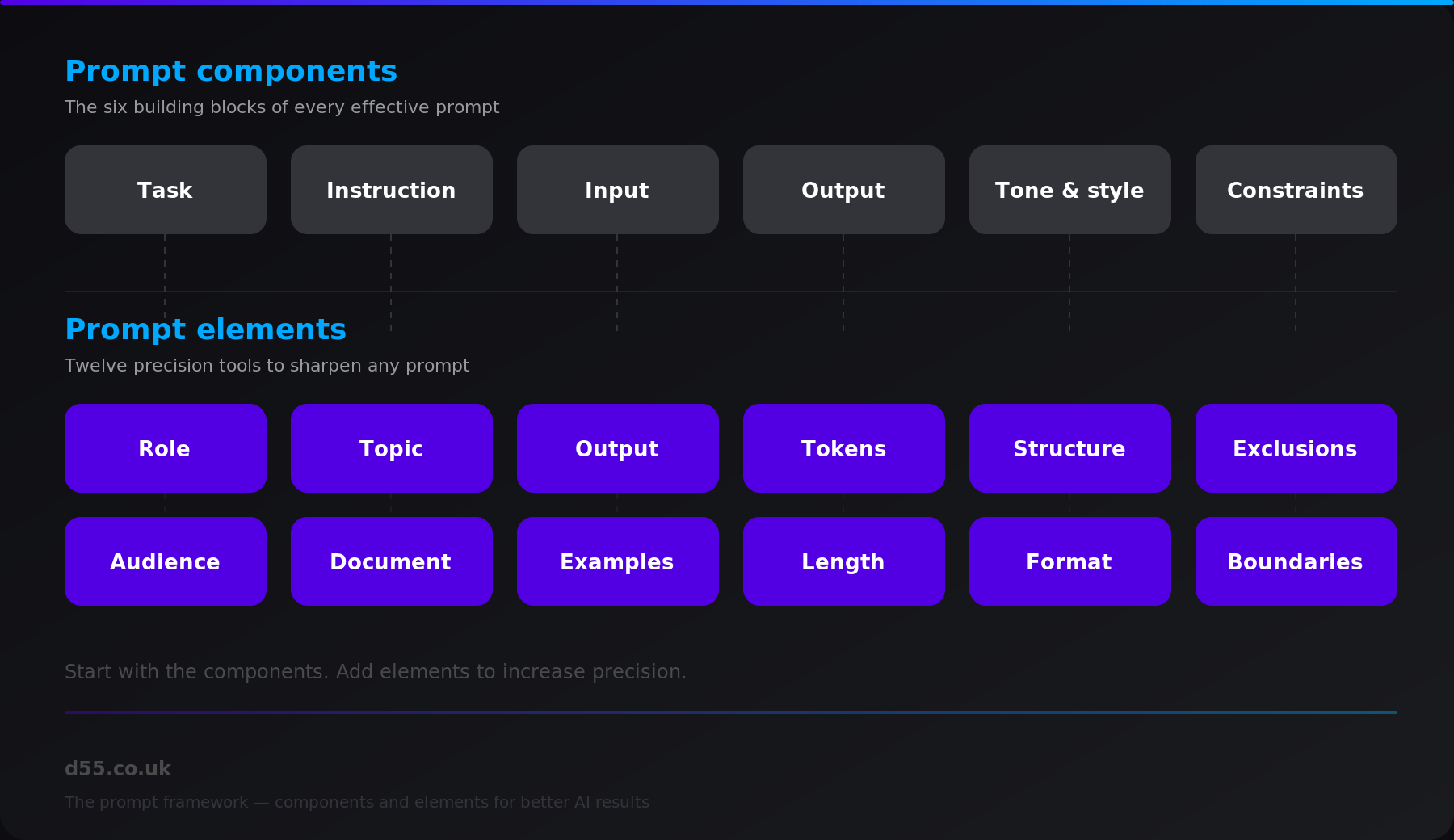
We use a two-tier framework: six core components that form the foundation of every prompt, and twelve elements that add precision when you need it. Here's the full picture.
Prompt components: the building blocks
Every effective prompt is built from six core components. Think of these as the structural foundation — the non-negotiable elements that tell the AI what you actually need.
Task — What do you want the AI to do? This is the action at the heart of your prompt. Be specific: "write", "analyse", "compare", "summarise". A clear verb sets the direction for everything that follows.
Instruction — How should the AI approach the task? This is where you add detail about method, approach, or process. For example: "Use bullet points" or "Compare against industry benchmarks".
Input — What information or data should the AI work with? This could be text you paste in, a dataset you reference, or context about your situation.
Output — What form should the result take? A report, a table, a list of recommendations, a draft email? Specifying the output format up front dramatically improves the usefulness of what you get back.
Tone and style — Should the response be formal or conversational? Technical or accessible? Matching the tone to your audience means less editing afterwards.
Constraints — What are the limits? Word count, time period, geographic scope, topics to avoid. Constraints stop the AI from going off on tangents and keep the output focused.
Prompt elements: adding precision
Within those six components, there are twelve specific elements you can use to sharpen your prompt further. You won't need all twelve every time, but knowing they exist gives you a toolkit for when a basic prompt isn't cutting it.
Role — Tell the AI what perspective to adopt. "As a financial analyst" or "As a customer support specialist" immediately changes the lens through which it approaches your request. This is one of the most powerful elements — it shapes vocabulary, depth, and assumptions.
Topic — The subject matter or focus area. The more specific you are, the more relevant the output. "Cloud migration" is good. "Cloud migration for mid-market energy companies running legacy SAP systems" is better.
Output — The desired format or type of response. A structured report, a comparison table, an executive summary, a draft proposal. Name it explicitly.
Tokens — The individual units of text that make up your prompt. In practical terms, this means being conscious of how much context you're providing. More relevant context generally means better results, but irrelevant detail creates noise.
Structure — How should the response be organised? Specify sections, headings, or a logical flow. "Start with an executive summary, then cover three key findings, then recommendations" gives the AI a clear blueprint.
Exclusions — What should the AI leave out? This is often overlooked but incredibly useful. "Do not include pricing information" or "Exclude anything about competitor products" keeps the output clean.
Audience — Who will read the output? A board paper for the CFO needs different language and emphasis than a technical brief for the engineering team. Stating the audience shapes everything from vocabulary to level of detail.
Document — References to external sources or materials. If you want the AI to work with specific documents, data, or reference material, point it there explicitly.
Examples — Sample outputs or illustrations that show the AI what good looks like. Providing even one example of the format or style you want can significantly improve accuracy.
Length — Be specific about how long the output should be. "500 words", "one page", "three bullet points". Without a length constraint, AI tends to over-produce.
Format — The structural requirements for presentation. Markdown, numbered list, table format, email format. This is particularly useful when the output needs to drop straight into another document or system.
Boundaries — The guardrails for the response. Date ranges, geographic scope, industry focus. Boundaries prevent the AI from making assumptions that don't match your context.
Putting it together
Here's the difference in practice. A weak prompt looks like this:
"Tell me about social media marketing."
That will return a generic overview that could apply to anyone, anywhere. Now compare it with a prompt that uses the framework:
"As a marketing strategist, analyse the effectiveness of social media campaigns for a B2B software company. Provide a structured report with three main sections, including specific metrics and two case studies. Maintain a professional tone and limit the response to 500 words."
The second prompt gives the AI everything it needs to deliver something genuinely useful. Every element serves a purpose, and the result will be focused, relevant, and close to what you'd actually use.
Start here
You don't need to memorise all eighteen elements. Start with the basics — task, input, output, and constraints — and build from there. The more you experiment, the more intuitive it becomes. Most people see a noticeable improvement in AI output quality within a few days of applying this framework consistently.
The key mindset shift is this: treat AI like a capable colleague who has just joined the team. They're smart, but they don't know your context yet. The better your brief, the better their work.
If you'd like to explore how AI can drive real productivity gains across your organisation, get in touch. We run hands-on AI Inspire workshops that take your team from theory to practical, everyday use.









.jpg)




.png)
.png)
.png)
























%20(1).jpeg)
.jpeg)



_028_(MP1_9361).webp)
_017_(MP1_9224).webp)

_032_(MP1_9595).webp)
_025_(MP1_9310).webp)
_033_(MP1_9603).webp)


.webp)

.webp)


